
Webex setup guide
Connect Aircover to Webex Meetings and Webex Calling
An Aircover org admin selects Connect on the Webex card in Settings, Integrations and signs in as a Webex Full Admin. A Webex Full Admin then authorizes the Aircover Service App in Webex Control Hub. Once both steps are done, Aircover tracks your Webex meetings, participants, and the recordings and transcripts Webex creates.
You need an Aircover org admin account and a Webex Full Admin. Reps who use Webex Calling connect it separately from their own Settings.
Steps
How do I connect Aircover to Webex Meetings?
Three steps in Aircover, then one in Webex Control Hub. The two parts can happen in either order; whichever finishes second turns the connection on.
Aircover Link your Webex organization
- 1Sign in to Aircover and open Settings, then IntegrationsGo to app.aircover.ai/settings/integrations as an Aircover org admin.
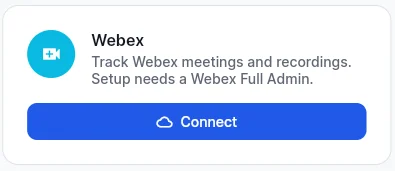
- 2Select Connect on the Webex cardThe card notes that setup needs a Webex Full Admin.
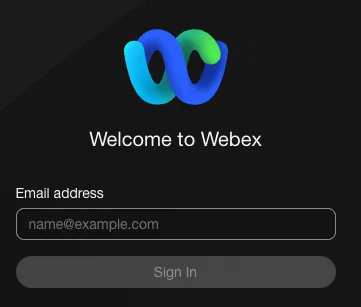
- 3Sign in to Webex as a Full AdminUse an account with the Full Admin role in your Webex organization. Aircover checks the role once, then discards that sign-in. If the account is not a Full Admin, nothing is linked.
Webex Control Hub Authorize the Aircover Service App
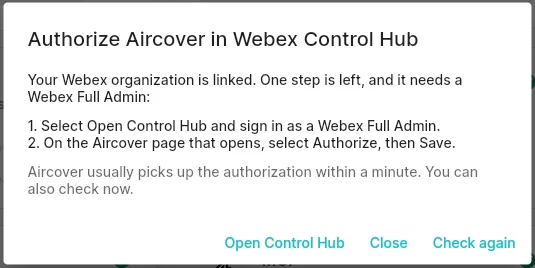
- 4Select Open Control HubUntil the Service App is authorized, Aircover shows Authorize Aircover in Webex Control Hub. Select Open Control Hub, or send the link to whoever holds the Full Admin role.
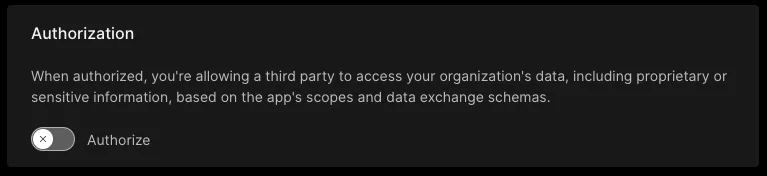
- 5Sign in as a Webex Full Admin, turn on Authorize, then SaveThe Aircover page in Control Hub is also under Management, Apps, Service Apps.
- 6Return to AircoverAircover usually picks up the authorization within a minute. Select Check again in the dialog to confirm it now.
Webex Calling
How does a rep connect Webex Calling?
Webex sends call events only to the person who places or takes the call, so each rep connects Webex Calling for themselves. It does not depend on the organization link above.
Aircover Each rep, once
- 1Open Settings, then IntegrationsFind the Webex Calling card.
- 2Select Connect and sign in to WebexUse the rep's own Webex account. It needs a Webex Calling license.
- 3Make or take a callCalls to and from outside numbers open in Aircover when they connect, the same way other dialer calls do. Internal, emergency and voicemail calls are ignored.
Before you start
What you need
An Aircover org admin account
Only org admins can link a Webex organization from the Webex card.
A Webex Full Admin
Full Admin is the Webex role that can authorize Service Apps in Control Hub. It can be the same person as the Aircover admin.
What the Service App can read
Aircover connects through a Webex Service App with read-only scopes.
- App type
- Webex Service App, authorized in Control Hub
- Scopes
- Read meeting schedules, participants, recordings and transcripts across the organization; read the organization name
- Events
- Meeting started and ended, participant joined and left, recording created, transcript created
- Webex Calling
- Separate per-rep sign-in that reads that rep's call events
Common questions
Webex integration FAQ
Who needs to be a Webex Full Admin?
The person who signs in to Webex during Connect, and the person who authorizes the Aircover Service App in Control Hub. One Full Admin can do both.
Why does Aircover show Authorize Aircover in Webex Control Hub?
Your Webex organization is linked, but the Service App is not authorized yet. A Webex Full Admin turns on Authorize for Aircover in Control Hub and selects Save, then you select Check again.
Does the Webex connection add a bot to my meetings?
No. The connection uses the Webex REST API and webhooks. It does not join your Webex meetings as a participant.
Why did the Webex sign-in say I'm not a Webex admin?
Aircover links a Webex organization only when the person signing in is a Full Admin of it. Ask a Webex Full Admin to select Connect, or to give you the role.
A rep can't connect Webex Calling. Why?
Webex Calling needs a Webex Calling license on the rep's own Webex account. Without one, Webex refuses the call events and Aircover reports that the account is not a Calling user.
How do I disconnect Webex?
Select Disconnect on the Webex card. Aircover removes its webhooks and tokens. The Service App stays authorized in Control Hub until a Webex admin removes it there.
Related
More integrations
Aircover also works with Zoom, Microsoft Teams and Google Meet, and syncs with Salesforce, HubSpot and ServiceNow. See all integrations, the Salesforce setup guide, or how AI Notes turns every call into a summary and follow-ups.